External MCP Servers
External MCP Servers let you bring external tools into Q by connecting to Model Context Protocol servers. Once connected, Q can discover and call tools exposed by these servers during your conversations.
This is the inverse of Q's own MCP Server (which pushes your product knowledge out). Here, Q acts as an MCP client — pulling capabilities in from external systems.
This feature requires the Builder or Team plan.
Use Cases
- Error tracking — connect a Sentry MCP server so Q can search and analyze production errors
- Documentation — connect a docs MCP server so Q can look up API references or library docs on demand
- Databases — connect a database MCP server so Q can query your data directly
- Internal tools — connect any internal MCP server to give Q access to your company's custom tooling
Supported Transports
Q supports two MCP transport protocols:
| Transport | Status | Description |
|---|---|---|
| Streamable HTTP | Supported | The modern MCP transport. Q tries this first. |
| SSE (Server-Sent Events) | Supported | The legacy MCP transport. Q falls back to this automatically. |
| stdio | Not supported | Local process-based servers (like most Cursor MCP servers) cannot run in a serverless environment. |
You don't need to choose — Q automatically tries Streamable HTTP first and falls back to SSE. Just provide the server URL.
Q can only connect to MCP servers with an HTTP or SSE endpoint. Servers that require a local process (stdio) are not supported. If your MCP server only supports stdio, you can use a bridge like supergateway to expose it over HTTP.
How It Works
Q uses a gateway pattern for external MCP tools. Rather than exposing every external tool directly, Q provides two internal tools:
- listMcpServerTools — Q calls this to discover what tools are available across all connected servers
- callMcpServerTool — Q calls a specific tool by server name and tool name when needed
This means Q only loads tool details on demand, keeping conversations efficient even when many servers and tools are connected.
Setup
Open project settings
Navigate to your project's Settings → Integrations page. Scroll to the Q Knowledge Sources section.
Add a server
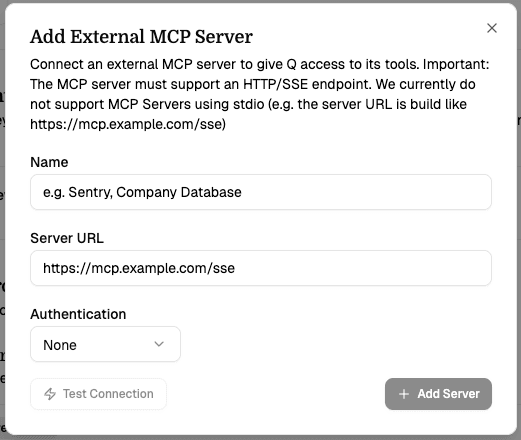
Click Add Server and fill in the server details:
- Name — a friendly label (e.g. "Sentry", "Company DB")
- Server URL — the HTTP/SSE endpoint URL
- Authentication — choose None, Bearer Token, API Key, or Custom Header
Test the connection
Click Test Connection to verify Q can reach the server. On success, you'll see the detected transport (HTTP or SSE) and a list of available tools.
Save and use
Click Add Server. The server is now active. Q will automatically discover and use its tools in your next conversation.
Managing Servers
From the integrations page you can:
- Toggle servers on/off — temporarily disable a server without removing it
- Remove servers — permanently delete a server configuration
Authentication
| Method | Description |
|---|---|
| None | No authentication. Suitable for local or trusted servers. |
| Bearer Token | Sends the token in the Authorization: Bearer <token> header. |
| API Key | Sends a custom header name and value (e.g. X-API-Key: abc123). |
| Custom Header | Same as API Key — any header name/value pair. |
Authentication credentials are encrypted at rest using AES-256-GCM before being stored in the database. They are only decrypted server-side when Q establishes a connection to the MCP server. Credentials are never exposed to the client or included in AI responses.
Current Limitations
- No stdio support — only HTTP and SSE transports are supported. Most MCP servers deployed for local use (e.g. in Cursor) use stdio and won't work directly.
- Serverless connections — connections are established per-request and closed after each response. Long-running MCP sessions are not supported.
- No OAuth flows — only static token/header authentication is supported. Servers requiring OAuth authorization are not yet compatible.