Agent Skills
Agent Skills let you extend Q with specialized knowledge by loading SKILL.md files into your project. Skills are instruction sets that teach Q domain-specific expertise — from code review conventions to database design patterns.
This is the inverse of Q's Agent Skill Export (which packages your product knowledge for other AI tools). Here, you're giving Q skills created by others — or by yourself — to make it smarter in specific areas.
This feature requires the Builder or Team plan.
Use Cases
- Code conventions — load a skill that teaches Q your team's coding standards, naming conventions, and architecture patterns
- Framework expertise — give Q deep knowledge of a specific framework (e.g. Next.js, Laravel, Rails) so it can give better guidance
- Review processes — teach Q your team's code review checklist or QA process
- Domain knowledge — give Q expertise in your industry (e.g. fintech compliance rules, healthcare data handling)
How Skills Work
Q uses a discovery / activation pattern for skills — it doesn't load all skill content upfront:
- Discovery — Q sees a list of skill names and descriptions in its system prompt, just enough to know what's available
- Activation — when a task matches a skill's description, Q uses loads the full instructions
- Execution — Q follows the loaded instructions for the current task
This keeps conversations efficient — skill content is only loaded when actually relevant.
The SKILL.md Format
Skills follow the open Agent Skills format. A SKILL.md file has YAML frontmatter with name and description, followed by the instruction body:
---
name: my-database-skill
description: Database design conventions and migration patterns for PostgreSQL projects.
---

# Database Design Guidelines

## Naming Conventions

- Use snake_case for table and column names
- Prefix junction tables with both related table names
  ...
The name and description fields are required — Q uses them for discovery. The body contains the actual instructions Q will follow.
Setup
Open project settings
Navigate to your project's Settings → Integrations page. Scroll to the Q Knowledge Sources section.
Add a skill
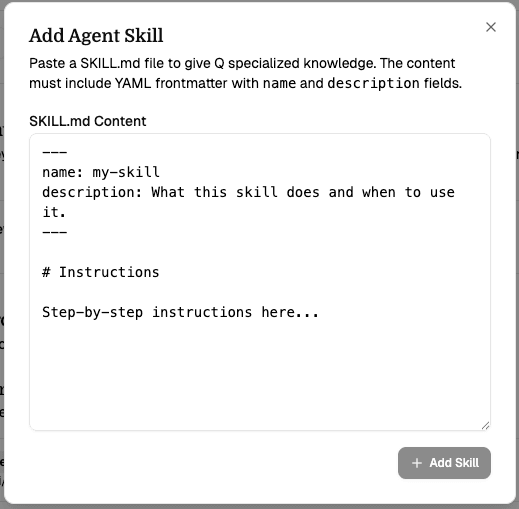
Click Add Skill and paste the full SKILL.md content into the text area.
Save
Click Add Skill. Q parses the frontmatter to extract the name and description, and stores the instruction body. The skill is immediately available in your next conversation.
Managing Skills
From the integrations page you can:
- Toggle skills on/off — temporarily disable a skill without removing it
- Expand a skill — click the chevron to preview the skill's instruction content
- Remove skills — permanently delete a skill
Where to Find Skills
- Official example skills from Anthropic
- Agent Skills specification for writing your own
- Export a skill from another Q project using the Agent Skill Export feature
Current Limitations
- SKILL.md only — only the core SKILL.md file is supported. The full Agent Skills spec also allows
scripts/,references/, andassets/folders, but Q currently only reads the single SKILL.md content. - Manual paste — skills are added by pasting content. URL-based fetching and marketplace browsing are planned for a future release.
- No executable scripts — skills are instruction-only. Q reads and follows them but cannot execute embedded scripts.